
Find your way around the Expedition screen
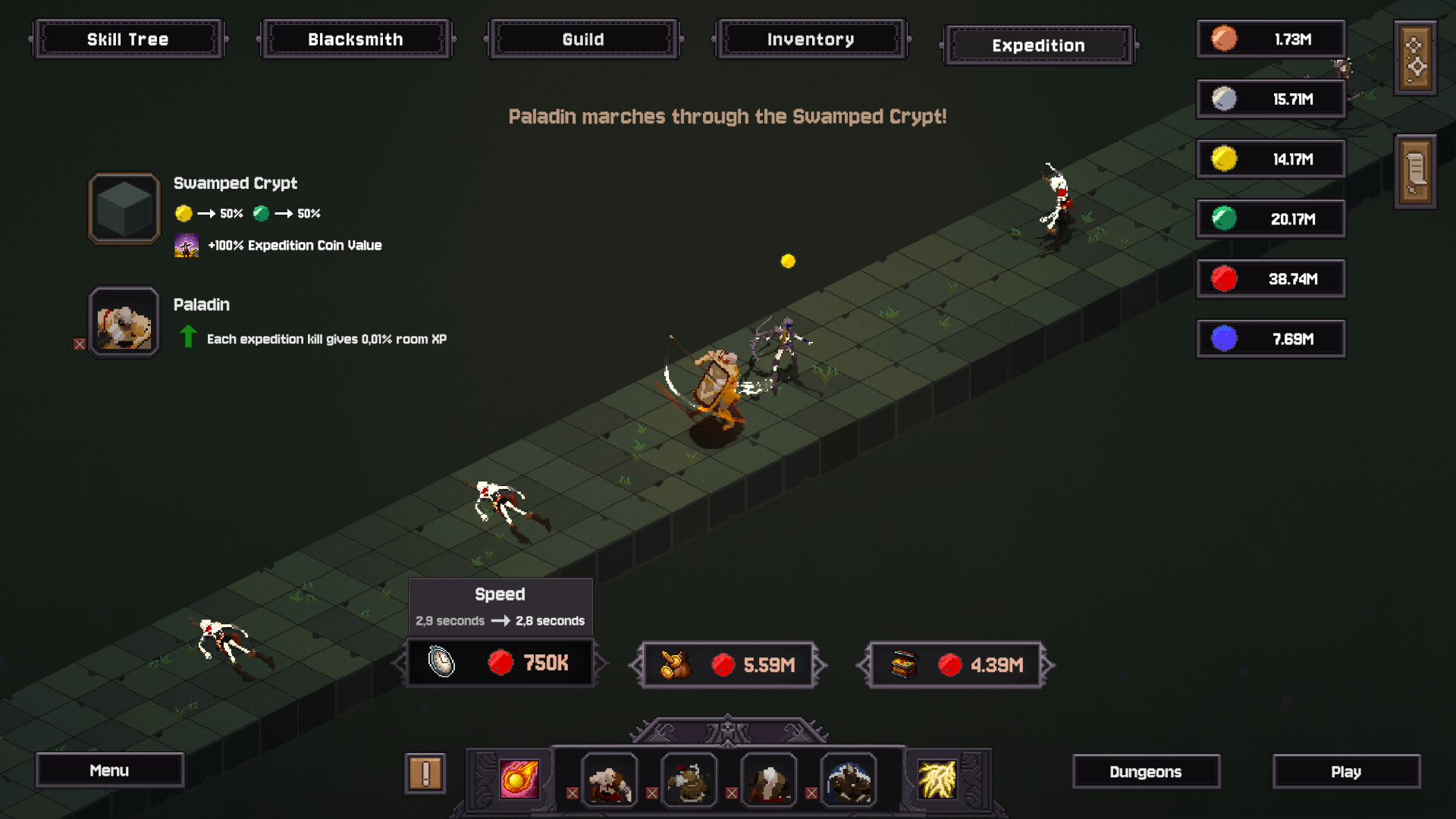
Open the Expedition tab once it is available in your game. The official screen shows a Paladin traveling through the Swamped Crypt, with the destination and hero information on the left and upgrade controls below the route.
- Check the destination. Look at the currencies listed under the room name.
- Read the room bonus. Expedition Coin Value is shown separately from the currency mix.
- Read the hero effect. It may contribute to another kind of progress besides coins.
- Inspect the upgrade tooltips. Compare what changes with the currency each purchase consumes.
The screenshot documents an Expedition already in progress. It does not establish the initial unlock requirement or every step of hero and destination selection, so follow the prompts in your current build for those steps.
Choose rewards that match your next purchase
In the Swamped Crypt example, the room lists gold and green currencies at an even split, plus an Expedition Coin Value bonus. Treat this as an example of where to read the reward mix—not a promise that every room pays the same way.
If your next upgrade needs a particular currency, compare that need with the selected destination’s rewards. A larger total is less helpful when most of it arrives in a currency you are not currently short of.
The Paladin can contribute to room growth
The Paladin tooltip in the official screenshot says Expedition kills grant room XP. That gives you a second question to ask: do you want this journey to help level the room as well as earn currency?
Compare that benefit with the other hero effects available in your version. Do not automatically choose by coin income alone if room progression is your current goal.
Compare an Expedition upgrade with your next main upgrade
The screenshot includes a Speed tooltip with a before-and-after time. Read the change as well as its cost. Other controls are visible, but their icons alone are not enough to establish their exact effects; open their tooltips before buying.
For a repeatable income improvement, estimate how long it takes the extra earnings to repay the cost. The upgrade payback example shows the calculation. Be especially careful when the upgrade spends the currency you were saving for a forge or Skill Tree node.
Check the destination’s currency mix, your hero’s extra effect, and one upgrade tooltip. Decide whether the Expedition is helping your current goal before investing more.
QUICK QUESTIONS
Before your next run
Were Expeditions in the original Demo?
The developer lists the Expedition system among the additions since the Demo. An early Demo walkthrough may not cover it at all.
Do Expeditions earn rewards while the game is closed?
The sources reviewed here do not confirm offline reward behavior. Do not plan around offline earnings until you have checked the current game’s explanation or tested your own save.
Sources & scope
Based on the full-release announcement, official store screenshots and game description, and clearly labeled Demo patch notes. Screenshots are examples, not live balance data.
Suggested comparisons and purchase decisions are editorial guidance, not playtested optimal routes. See how this guide was put together.
Found an error? Read the corrections policy with the page, game version, and supporting screenshot or source.